
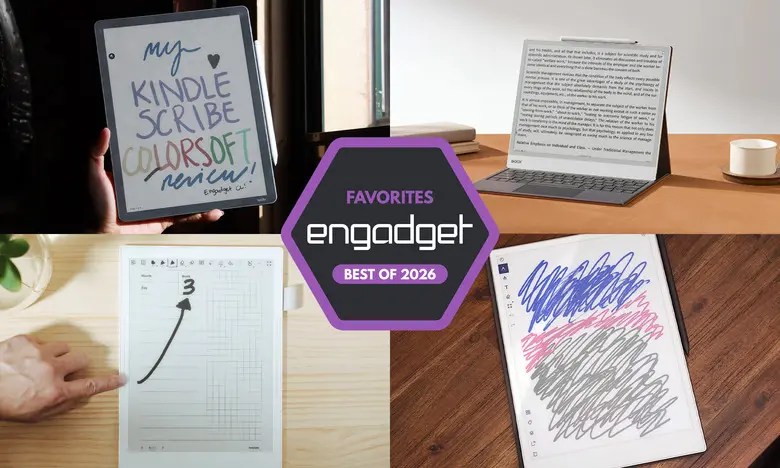
E Ink tablets have evolved considerably over the past few years. Once niche digital notebooks, they now come in multiple sizes, feature color displays, and some even double as full-fledged e-readers. For people who love the tactile feel of pen and paper but want the convenience of cloud storage and search, these devices offer a happy medium. After testing close to a dozen models, we have narrowed down the best E Ink tablets for 2026 based on writing quality, reading experience, build, battery life and value.
Best E Ink tablets for 2026
reMarkable 2: Best E Ink tablet for most people
Screen size: 10.3-inch | Battery life: Two weeks | Connectivity: Wi-Fi | Storage: 8GB | Included stylus: No | Supported files: PDF, EPUB
The reMarkable 2 remains our top pick for most people because it offers the best mix of writing performance, ease of use and portability. It weighs less than a pound and has a sleek, minimal design. The 10.3-inch monochrome display feels close to real paper, and the low-latency stylus experience is excellent. It supports PDF and EPUB files, and you can add documents through desktop, mobile, or cloud services like Google Drive, OneDrive and Dropbox. The Read with reMarkable Chrome extension is a handy way to save articles for later.
The device includes eight brush types, customizable line thicknesses, and handwriting-to-text conversion. A Connect subscription, which costs $3 per month or $30 per year, unlocks unlimited cloud storage and cross-device note syncing. New buyers get a one-year membership. The main downsides are the extra cost of the stylus and the subscription requirement for the best cloud experience, but the core note-taking and reading experience is hard to beat.
- Pros: Great reading and writing experience, Google Drive and Dropbox support, easy to use
- Cons: Marker costs extra, expensive, unlimited cloud storage requires subscription
reMarkable Paper Pro: Best premium E Ink tablet
Screen size: 11.8-inch | Battery life: Two weeks | Connectivity: Wi-Fi | Storage: 64GB | Included stylus: No | Supported files: PDF, EPUB
The reMarkable Paper Pro elevates the e-paper experience with a larger 11.8-inch display, a faster processor, and a color screen that uses modified E Ink Gallery 3 technology. It can produce thousands of colors, making highlights and annotations more useful. The design is premium, with grooved edges and a thin 5.1mm profile. Writing latency is just 12ms, so it feels nearly instantaneous.
The software is the same streamlined interface found on the reMarkable 2, which prioritizes focus and simplicity. Performance is noticeably snappier, and the front light is a welcome addition for working in dim environments. The main downside is price: $629 with the standard Marker. The optional Connect subscription remains useful for heavy users, though 64GB of internal storage is plenty for most.
- Pros: Color is a welcome addition, backlight works well, vastly improved performance
- Cons: Expensive
Amazon Kindle Scribe: Best e-reader E Ink tablet
Screen size: 11-inch | Battery life: Months | Connectivity: Wi-Fi, Bluetooth | Storage: Up to 64GB | Included stylus: Yes | Supported files: AZW3, AZW, TXT, PDF, unprotected MOBI, PRC and more
The Kindle Scribe is the best choice for people who already buy books from Amazon. The latest model has a refined design with uniform bezels, a larger 11-inch screen, a faster processor and an improved front light. The included pen feels comfortable and attaches magnetically. Writing latency is very low, and the interface is much quicker than earlier models.
The Scribe integrates tightly with Kindle books, allowing you to underline and highlight text, though full margin annotations are not available in every title. The new home screen provides quick access to notes and recently opened books. AI Search can summarize and search handwritten notes, but it is still inconsistent. The biggest strengths are the Kindle ecosystem access and the smooth performance. Note that there is a cheaper $430 model without a front light, which we do not recommend; the $500 version with the improved front light is the better buy.
- Pros: Fast performance, low-latency writing, seamless Kindle integration, premium pen included
- Cons: AI Search needs work, annotating Kindle books can be inconsistent
Supernote A6 X2: Best E Ink tablet for writing and note-taking
Screen size: 7.8-inch | Battery life: Weeks | Connectivity: Wi-Fi, Bluetooth | Storage: 32GB, expandable up to 2TB | Included stylus: No | Supported files: PDF, EPUB, Word, TXT, PNG, JPG, CBZ, FB2, XPS
The Supernote A6 X2, also known as the Nomad, is a compact 7.8-inch device that focuses on the writing experience. The FeelWrite 2 screen protector provides a smooth, paper-like texture, and the writing latency is minimal. The device is user-repairable, with a replaceable battery and microSD slot visible through the clear back panel. Dual sidebars make it comfortable for left- and right-handed users.
Supernote's software is full of clever tools for note organization. The keyword feature translates handwritten words into searchable tags, and the device supports many file formats. There is also an Atelier painting app for digital art. The main downside is that there is no backlight, and the stylus is an extra cost. The larger Manta A5 X2 model offers a 10.7-inch screen for $505.
- Pros: Excellent writing feel, tons of notebook customization, good handwriting recognition
- Cons: Pen costs extra, no backlight
Onyx Boox Note Air4 C: Another color-display option
Screen size: 10.3-inch | Battery life: Weeks | Connectivity: Wi-Fi, Bluetooth | Storage: 64GB | Included stylus: Yes | Supported files: PDF, PPT, EPUB, TXT, DJVU, HTML, RTF, FB2, DOC, MOBI, CHM, PNG, JPG, TIFF, BMP
The Boox Note Air4 C is a color E Ink Android tablet. It runs Android 13 with access to the Google Play Store, so you can install Kindle, Kobo, and other apps. The writing experience is smooth, with multiple brush options and colored ink support. The note-taking app lets you organize pages, insert shapes, and even add voice recordings. The AI handwriting recognition is quite accurate, though it may confuse symbols like ampersands.
Because it is a full Android tablet, you can browse the web and watch videos, but the E Ink screen is not ideal for fast-moving content. The versatility of Android makes this a great choice for people who get their reading material from many sources. At $529 with pen and case included, it is on the expensive side, but it offers unmatched flexibility.
- Pros: Color E Ink, Android 13 with Play Store, many ways to add files, stylus included
- Cons: E Ink not good for video, not as user-friendly, expensive
Onyx Boox Note Max: A big-screen option
Screen size: 13.3-inch | Battery life: Weeks | Connectivity: Wi-Fi, Bluetooth | Storage: 128GB | Included stylus: Yes | Supported files: PDF, PPT, EPUB, TXT, DJVU, HTML, RTF, FB2, DOC, MOBI, CHM, PNG, JPG, TIFF, BMP
The Boox Note Max is the answer for anyone who wants maximum screen real estate. Its 13.3-inch E Ink Carta 1300 display is sharp and spacious, making it ideal for reading PDFs, taking notes, and sketching. The Calendar Memo app is particularly useful, letting you tap on a day to write notes and keep a daily journal.
The Note Max runs Android 13 and includes a stylus and cover, but it costs $689. There is no front light, and the software is not as approachable as reMarkable's, but the large display is a luxury for those who prefer A4-size paper.
- Pros: Sharp display, huge 13.3-inch screen, Android 13, stylus and cover included
- Cons: No front light, less user-friendly, expensive
Honorable mention: reMarkable Paper Pro Move
Screen size: 7.3-inch | Battery life: Two weeks | Connectivity: Wi-Fi | Storage: 64GB | Included stylus: Yes | Supported files: PDF, EPUB
The Paper Pro Move is a compact version of the Paper Pro. It has a 7.3-inch Canvas Color display and a design that resembles a steno pad. Build quality is excellent, and the software is the same as the larger model, with drag-and-drop toolbar, note search, and handwriting conversion. It is best for note-taking rather than reading, and it costs $449 with the standard marker. No keyboard folio is available, but the size makes it highly portable.
- Pros: Compact, excellent build, good battery
- Cons: Expensive for its size, no keyboard folio
Honorable mention: Kobo Libra Colour
Screen size: 7-inch | Battery life: Up to 40 days | Connectivity: Wi-Fi, Bluetooth | Storage: 32GB | Included stylus: No | Supported files: EPUB, EPUB3, FlePub, PDF, MOBI, JPEG, GIF, PNG, BMP, TIFF, TXT, HTML, RTF, CBZ, CBR
The Kobo Libra Colour brings color and stylus support to a more traditional e-reader. You can highlight text, write in the margins of ebooks, and create notebooks. It integrates with Dropbox and Google Drive for easy file transfer. The seven-inch screen is smaller than most tablets, but the faster processor and warm front light make it a pleasant reading device.
The stylus is sold separately, which adds $70 to the $219 price. For about $300, you get a capable E Ink tablet that is cheaper than the Kindle Scribe. If you do not rely on the Kindle ecosystem, the Libra Colour is a solid alternative with a more natural note-taking experience in books.
- Pros: Color display, low-latency stylus, write in the margins of any ebook
- Cons: Smaller screen, stylus extra
Are E Ink tablets worth it?
E Ink tablets are worth it for a specific kind of person. If you love the look of e-paper and want a more focused replacement for a paper notebook, they make a lot of sense. They are also great for anyone who gets easily distracted by notifications, social media, and other temptations found on traditional tablets. The main limitations are the slower refresh rate, lack of vibrant colors, and limited app support compared to iPads and other LCD tablets.
What to look for in an E Ink tablet
Writing and latency
The most important factor is the writing experience. A good E Ink tablet should have low stylus latency and a screen that refreshes quickly enough to keep up with your hand. Some devices come with a stylus, while others require an extra purchase. Always check before buying.
Reading
Consider how much you will read on the device. Larger screens are better for writing but can feel heavy during long reading sessions. Also check supported file formats. If you buy books from Kindle or Kobo, you will have the easiest time with a tablet made by the same company. Third-party devices may not support DRM-protected files.
Search functionality
Some E Ink tablets can search handwritten notes and convert them to typed text. Others simply save your annotations as images. If you plan to refer back to your notes, look for strong search and handwriting recognition features.
Sharing and connectivity
All E Ink tablets have Wi-Fi, but cloud syncing and companion apps vary. Some offer unlimited cloud storage for a fee, while others let you export notes via email or Google Drive. Consider how you want to access your notes after you write them.
Price
E Ink tablets generally cost between $300 and $800. Prices have risen recently due to supply chain and production costs. Smaller models with fewer features are cheaper, but may lack stylus support or a backlight. Decide which features matter most and set a realistic budget.
Other E Ink tablets we've tested
Onyx Boox Tab X C
The Tab X C is a large 13.3-inch color E Ink tablet that runs Android 13. It is powerful and slim, but the $820 bundle price makes it a niche product for dedicated enthusiasts.
Lenovo Smart Paper
Lenovo's Smart Paper has solid hardware but its software depends heavily on Lenovo's cloud service, which comes at a monthly cost in some regions. It is too limited compared with competitors like reMarkable and Boox.
Onyx Boox Tab Ultra
The Tab Ultra is designed as an all-purpose Android tablet with an E Ink screen. It can browse the web, check email, and even watch videos, but the display is better suited for reading and writing. A standard 2-in-1 laptop is a better choice for most people who need those functions. Like the rest of Onyx's devices, the Tab Ultra is for those who prioritize eye comfort and focus above all else.
Source:Engadget News